Showing posts with label Eclipse Installation In java. Show all posts

Installing JDK For Eclipse

  • Check the www.oracle.com site to get the link to download jdk as in screencast below
Downloading-jdk-from-eclipse.com
  • Click the button to download jdk as in the screen cast

  • In the next step select the operating system for which you wanted to install.read the agreement and click on the continue button as below
select-os-for-jdkSelected-os-for-jdk

  • Then download begins and save to a location in your hard disc as below
save-the-jdk-to-a-location
  • After the download click the setup file to install jdk
click-the-setup-file-to-install-jdk
  • Then there appears a screen to change the installation directory.This is not mandatory(if you wanted to change you can do it as below)

changing-the-directory-if-needed
  • Then click the finish button.this completed the installation.now we need to verify the installation

  • Just open up a command prompt and move to installation directory and type cd bin and check for java version by giving version-v as below.If the version is shown correctly there is no doubt that its installed perfectly
check-for-installation-of-sdk

  • Also take the command prompt and check for whether the java compiler is installed at the proper path by giving javac command as below
Installation-aborted

  • This is because of missing of some of the settings.That means jdk installation path provided in the advanced system settings is wrong .Inorder to make it working properly just go to location C:\Program Files.
sdk-installation-path-verification
  • In that location there should be a folder named java and inside that java folder there should be a file with jdk version as below(If its not there the installation is a failure one.)

JDK-folder-should-be-present
  • Then go and click jdk folder and go inside the bin folder and rightclick on any of the exe files inside the bin folder and check for properties as shown below
righclick-on-the-any-of-files-in-bin
  • This is where you should tell your java to look for your compiler.So Copy that path as shown below.

Copy-the-jdk-path
  • Then Right click on My Computer and click on properties and then click on Advanced system settings as shown below
Advanced system settings in properties

  • Under Advanced system settings there is a section called environmental variables.Over there create a new variable called path and give the value as jdk path ie where jdk is(copied minits back)
Create-environmental-variable-called-path

  • Then save the settings.
Environmental variable save
  • Now go to command prompt and type javac you will get the result as shown below
Check-for-installation-of-jdk

Installing Eclipse on Windows Linux and mac

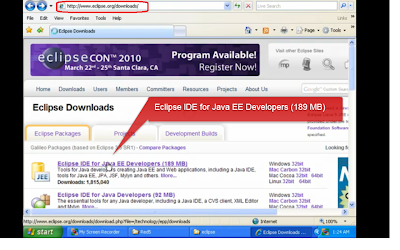
  • First Step is go to url www.eclipse.org and check for the for downloading eclipse

  • Then click on the download link as shown in figure.


Installing-Eclipse-on-Windows-Linux-and-mac
  • Once the save dialogue box is opened click the save button to save the zipped file version of eclipse into your hard drive.
Save-the-zipped-eclipse-file


  • Then extract the zip files and save into location C:\Program Files as shown in figure below

  • Once it is extracted we can see a folder directory called eclipse in your computer as below
Extract-the-eclipse-setup-files
  • Then in that folder heirarchy you can see an eclipse.exe file .Create a shortcut of that in your desktop and double click on that icon you can see eclipse opened in a new window
Eclipse-installation-step
  • This pops up with a window which asking me to set up a path where my java projects will be stored.So i put that in MyDocuments/eclipse.ie my workspace
  • saving-the-eclipse-program-pathFor testing purpose create a small project called test and inside that test create a class called


Create-a-new-project-for-testing

For testing purpose create a small project called test and inside that test create a class called test.from the folder hierarchy in eclipse i double click on the test.java file and the code fragment is as below.

Code-view-in-eclipse

To that add System.out.println("testing"); .if the project undergo proper debugging we will get testing in the console.
Console-output-tocheck-eclipse-installation
So finally have a happy programming.If you like my article please post comments.

Template by - Mathew | Mux99